
Matrix is a secure and open source chat protocol that can be used to communicate with others. It’s kind of like discord… If discord wasn’t owned by anyone in particular and had end-to-end encryption available. Today I’ll show you how to make an account on my Matrix server, weebsweb.com.
Register an Account
The first step is to register an account. Luckily the main Matrix client provides a registration link.
- Go to app.element.io
- Click on Create Account
- Change the server name (see below)
Before you create the account, take a look at the server name. Since matrix is not owned by any one company, you can sign up on any matrix owners server. It will most likely suggest using matrix.org’s official server. We want to use our own server so we’re going to click edit:
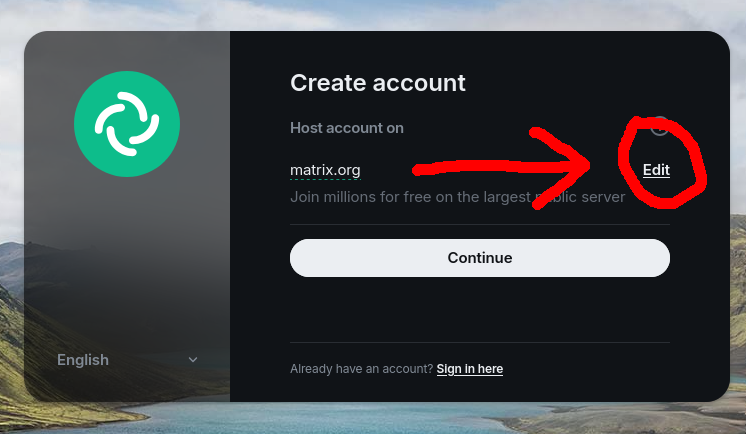
- Press the tickbox next to Other Homeserver and enter the following: weebsweb.com
- Create a username
- Create a password
- Get a registration token from whoever invited you.
A registration token is needed to use weebsweb.com as your account’s server. This is to prevent bot spam and deter malicious users. A request form is in the works but for now you’ll just have to ask me if you know how to contact me or ask a friend who’s using the server.
Install Element
You need a application designed to communicate via the Matrix protocol in order to use your account. Element is the most popular client for Matrix.
- Download and install Element from their official website.
- Linux Users ~ There is a Flatpak on Flathub you can use instead of their official package. I personally use this and it works great.
- You can also use Element on any web browser via their web app. https://app.element.io
Log Into Element
Now we just need to log with the account we created to begin using it. Make sure to change the server to weebsweb.com when you try to sign in!
- Click Sign In
- Click Edit by the server name
- Write Weebsweb.com for the server
- Sign In with the account you created
You’re In!
Have fun! It should bring you right to my landing page which will guide you through getting connected to the Spaces and Rooms that you want to take part in.